
What Langsys does
Langsys sits between your code and your translators. Your app keeps rendering English until a translation is ready, then shows it without a rebuild.
Continuous translation
There are no translation files to export, merge or ship. When a phrase renders for the first time with a write key, Langsys registers it. From then on it's in your project, waiting for translation.
<button>{$t('Place order', 'Checkout')}</button>
<p>{$t('Delivery in {days} days', 'Checkout', { days: 3 })}</p>
Placeholders are type-checked at compile time, so a missing value fails the build, not the page.
AI first, people where it matters
Machine translation fills every locale in seconds. Your translators then review the phrases that carry your brand, and their edits replace the AI draft for every user.
| Locale | AI draft | What users see after review |
|---|---|---|
| Deutsch | Ihre Bestellung wird morgen versandt. | Ihre Bestellung wird morgen versendet. |
| Español | Su orden se envía mañana. | Tu pedido se envía mañana. |
Source phrase: “Your order ships tomorrow.”
Content blocks
Marketing pages and articles are more than single phrases. Wrap a block of HTML and translators work on it as one piece, seeing the same structure and styling your users see.
<Translate category="Blog" tag="article">
    <h1>Spring release notes</h1>
    <p>Exports are now <strong>twice as fast</strong>.</p>
</Translate>
Translation memory
Every approved translation is kept. When the same or a similar phrase appears again, in this project or another one you choose to share with, the existing translation is suggested instead of starting over. Included on all paid plans.
- Consistent terminology across products
- Lower cost for repeated text
- Faster review, because translators start from an approved phrase
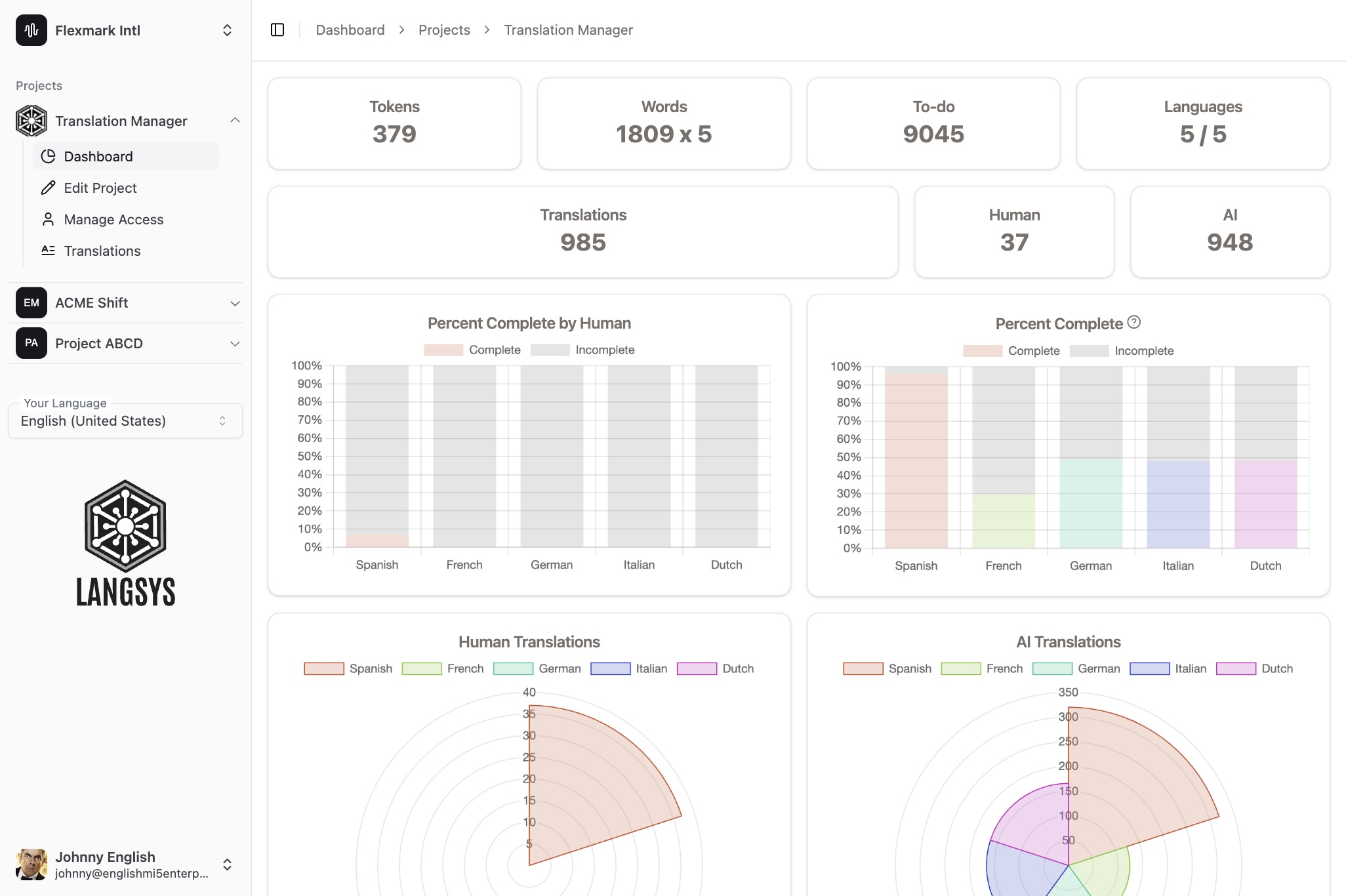
See where every language stands
The project dashboard shows how much of each language is translated, and how much of that was done by people or by AI.
Works with your stack
- Svelte
npm install langsys-js-svelte- React
npm install langsys-js-react- Vue
npm install langsys-js-vue- TypeScript
npm install langsys-js-typescript- Anything else
- Use the REST API to create phrases and fetch translations from any language or platform. API reference
Separate keys for development and production
- Write key
- Use it in development. New phrases and content blocks are registered as they render.
- Read-only key
- Use it in production. The SDK only fetches translations, so page views never create new phrases.